
Productivity Hack for Your To-Do List

Welcome to the #culturedrop. Every Tuesday, Galen Emanuele emails tools to advance leadership skills, team culture, and personal growth. No spam, just great content. Sign up now to get it in your inbox.
A simple productivity system for unpredictable schedules
If you work from home, travel for events, or have meetings scattered randomly across your calendar, then you may have noticed what I noticed about trying to stay productive consistently. IT’S SO HARD.
I work remotely a lot, and don’t have an office where I see my team every day. Staying consistent has been a real challenge for me. After trying plenty of approaches, like ‘time blocking’ off specific times during the day for certain activities etc. I landed on something that has finally stuck and is working for me, and I’m sharing it in case it works for you too.
“I gave time blocking a real shot. In theory it’s tidy. In practice, it never works for me.”
Why time blocking doesn’t work for me.
I gave time blocking a real shot. The idea is to carve your day into sections: emails and busy work from this time to that time, deep work from here to there, and so on. In theory it’s tidy. In practice, it never works for me. My meetings and calendar are so sporadic and my schedule changes depending on where I’m traveling. Once one block gets interrupted, the whole plan falls apart, and I can rarely ever make it through a day where I put time into the things I want and need to.
That system assumes a somewhat predictable day, and that’s just not my life.
“The layout for the day is seven or eight rows, and each row is a category of things I want to do that day.”
Enter the Weekly Action Journal.
I call it my weekly action journal, mostly because I couldn’t think of a better or clever name. It’s a simple spreadsheet/column build in a Google Drive document with a table, setup as a daily checklist. The layout for the day is seven or eight rows, and each row is a category of things I want to do that day.
Each row has three labeled columns: “Task”, “Notes”, and then on the far right a column called “Progress” with drop down that has two options to choose from “Done” that’s highlighted green, and “Not Done” that’s highlighted red. Throughout the day as I accomplish any of the rows I mark it as done, choose what’s next, and get into whatever that is.
Here’s a sample of what some of my categories look like (there is an image at the end of this blog to show what it looks like):
Work Out: Working out
Meditating & Prep, making coffee, reviewing my task list, and taking a moment to sit and chill before the day starts.\
Most Important Thing: What’s the one, biggest and most important thing I need to make sure to do today.
Emails & Busy Work: self explanatory.
Stop for Lunch: Yes, this is on the list. I’ll reach 3 or 4pm and realize I haven’t eaten yet, so stopping for lunch earned its own spot.
Every morning I copy the template, label it with the day of the week, and fill in what matters most.
At the beginning of the day as part of my prep for the day I usually write down one or two things in the row that I need to do. So an example of a couple rows might look like this:
TASK
Most Important Thing: Submit proposal for SHRM conference keynote.
Emails & Busy Work: Respond to Jeff, email Terri, slack Jenny about camera.
“I can pick from the list in whatever order makes sense based on my energy, enthusiasm, or how the day unfolds.”
The flexibility is the key.
The big difference from time blocking is that nothing here is tied to a clock. I can pick from the list in whatever order makes sense based on my energy, enthusiasm, or how the day unfolds. A meeting runs long? No problem. I’ll tackle email later or flip the order around. The checklist doesn’t care when things happen, only that they happen.
By the end of the day, I’m a checklist person at heart, so getting things crossed off feels great. I can mark that I worked out, that I stopped for lunch, and that I finished my one important thing, and then jot a quick note/adjustment about what I did. It only takes seconds to update throughout the day, and prepare at the beginning of the day.
An unexpected bonus: a record of your days
I’ve been doing this for about a month now, and something that I find nice is that it is super easy to look back at any single day or the week and see exactly what I accomplished, or didn’t do. I never used to do that. Having a running record has made me more aware of my own patterns, and seeing the progress and things marked as “done” is gratifying.
“If you’re like me and struggle to build a consistent routine with an ever changing schedule and without the structure of an office, this might be worth a try.”
Give it a shot.
If you’re like me and struggle to build a consistent routine with an ever changing schedule and without the structure of an office, this might be worth a try. All you need is a spreadsheet with seven or eight rows that segment your day into high level tasks, and a drop down checklist at the end to mark it as done or not done.
Make it yours, adjust the categories, and tweak it any way that it might work for you. It has made a real difference in how I manage my time, and I hope it helps you too:)
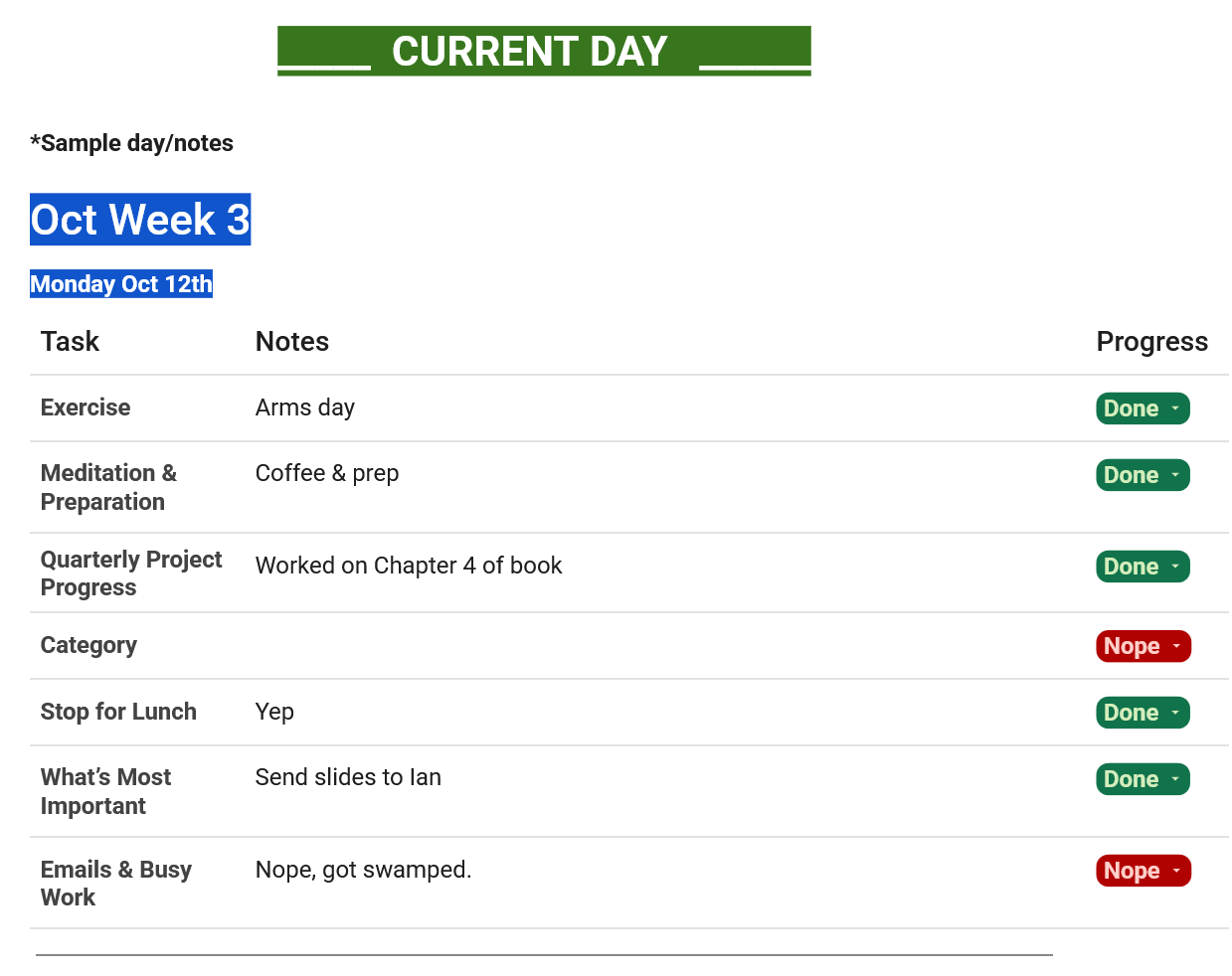
Here’s a screenshot of what it looks like:)

Want more?
This article was created by Galen Emanuele for the #culturedrop. Free leadership and team culture content in less than 5 minutes a week. Check out the rest of this month's content and subscribe to the Culture Drop at https://bit.ly/culturedrop
MORE